Home
You are here: バーチャルキャスト公式Wiki TOP » VirtualCast Official Wiki Top » VirtualCast TOP » Studio » Menu [Studio] » Change Background [Studio]

Language:
  • ja
  • en

Sidebar

VirtualCast Official Wiki


  • Wiki TOP

  • Events
  • FAQ

Device

  • Recommended Spec
  • VR Device Top
  • Controller TOP

Application

  • How to use the title screen
  • Settings [Steam Settings]

Beginners Guide

  • The first page to see for beginners

Studio


Menu

Basic operation

Room


Menu

Basic operation

Public Rooms

Quest


Download VirtualCast

Create Account

  • Character
  • Item
  • Location
  • About the Beta

Account


Create Account

Integration[Steam]

Broadcasting

  • Broadcasting Tools
  • Streaming Sites

Tips

  • Tips
  • Logo guide line

Wiki Editors Only
  • Sidebar


Development

  • Unity Top
  • VSCode Top

VRM


Blendshape

Swingable

VCI


Create the first VCI

What is possible with VCI


List of VCI examples

VCI Script Reference

Material

glb(Background)

  • Create GLB
  • Animation locations
en:virtualcast:studio:ringmenu:bgchange

Change Background [Studio]

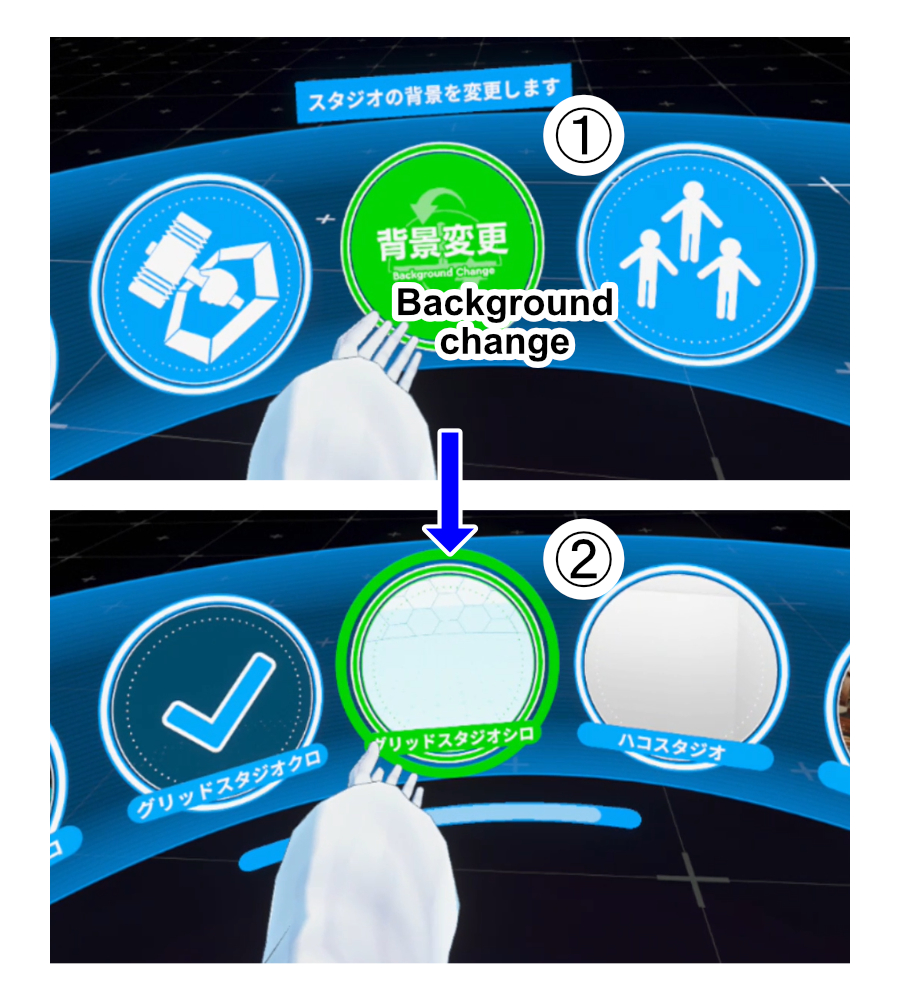
Change the location of studio.

In the Ring menu, select [Change Background] and choose the location of your choice.

operation_change_background.mp4
Last modified: 2023/03/08 18:10